What to Expect During a CT Scan with Contrast
A complete guide to CT scans with contrast dye - from preparation to recovery. Know what to expect and feel confident.
Anna from OncoSteps
8 min read
Loading content...
A complete guide to CT scans with contrast dye - from preparation to recovery. Know what to expect and feel confident.
If you've been scheduled for a CT scan with contrast, it's completely natural to have questions or feel a bit nervous. Understanding what to expect can help ease your mind and prepare you for a smooth experience. This guide walks you through the entire process - from preparation to recovery.
A CT (Computed Tomography) scan is a powerful imaging tool that takes detailed pictures of your body's internal structures. When contrast dye is used, it helps highlight blood vessels, organs, and tissues, making it easier for doctors to see abnormalities such as tumors or areas of concern.
Contrast dye can be given:
"Knowledge is power. Understanding what to expect can transform anxiety into confidence."
1. Fasting Requirements
2. Medications
3. What to Bring and Wear
4. Oral Contrast (If Required)
When you arrive, a radiology technologist will greet you and explain the process. They'll ask about your medical history and confirm any allergies or previous reactions to contrast dye.
If IV contrast is needed:
Don't worry - these sensations typically last only 1-2 minutes.
The CT scanner is open on both ends, making it less confining than an MRI machine. If you're anxious, let your team know - they're there to help you feel comfortable.
Here's an example of what a contrast-enhanced CT scan image looks like. This abdominal CT scan shows detailed internal structures that the contrast dye helps highlight:
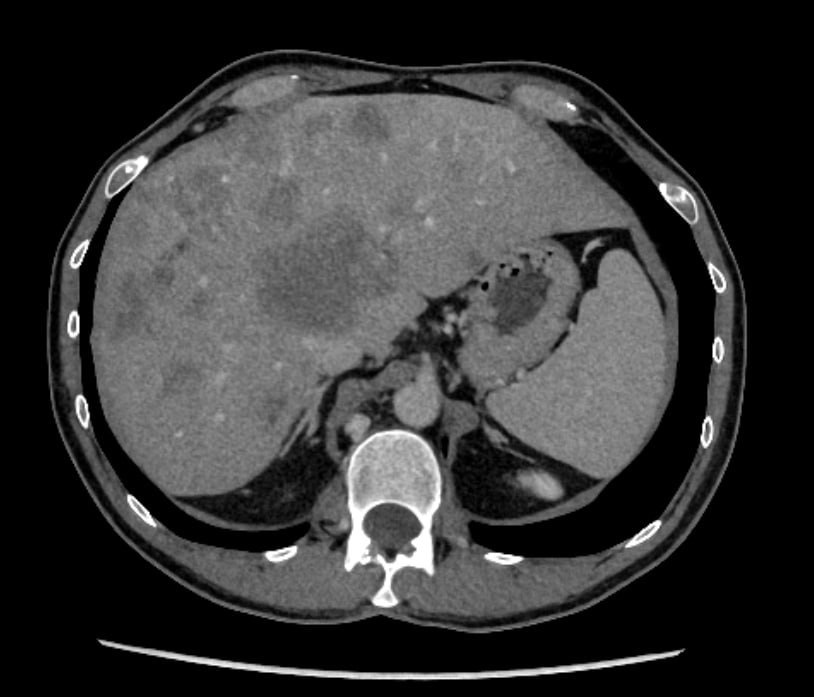
This is a CT scan from Dima, OncoSteps' founder, showing extensive liver metastases from colorectal cancer after multiple rounds of chemotherapy. As someone who has personally navigated the challenges of cancer diagnosis and treatment, Dima founded OncoSteps to help others better understand their scans and make informed decisions about their care.
| Sensation | Cause | Duration |
|---|---|---|
| Warm feeling | IV contrast spreading through bloodstream | 1-2 minutes |
| Metallic taste | Normal reaction to contrast dye | 1-2 minutes |
| Urge to urinate | Warm sensation in pelvic area (normal) | Brief |
Most people tolerate contrast dye very well. However, in rare cases, some may experience:
Seek immediate help if you experience:
These severe reactions are extremely rare, and medical staff are trained to respond immediately.
Important tip: After your CT scan is complete, ask the imaging center for a DVD copy of your scan images. Many hospitals don't provide this automatically, but it's your right to have a copy of your own medical records.
Having your scan images can be valuable for:
Don't hesitate to ask for your scan on a DVD or digital format before leaving the imaging center. It's a simple request that could save you time and hassle later.
✅ Communicate openly with your healthcare team about any concerns or allergies
✅ Follow preparation instructions carefully to ensure the best image quality
✅ Stay hydrated before (if allowed) and especially after your scan
✅ Bring a list of your medications and any relevant medical records
✅ Arrive early to allow time for paperwork and preparation
✅ Wear comfortable clothing to make changing easier
Always inform your healthcare team if you're pregnant or breastfeeding. They'll determine the safest approach for your imaging needs.
Contrast dye is processed by your kidneys. If you have kidney disease or reduced kidney function, your team may:
If you've had allergic reactions to contrast dye in the past, tell your team. They can:
We understand that medical procedures can feel overwhelming, especially when you're already dealing with a health challenge. Remember:
If you have questions or concerns before your appointment, don't hesitate to reach out to your healthcare team. They want you to feel informed and comfortable.
Have questions about preparing for medical imaging or other appointments? The OncoSteps app can help you track your appointments, medications, and symptoms - keeping everything organized in one place.